How to Divert Your Landline Calls to Mobile
In today’s fast-paced world, staying connected is more crucial than ever, and managing communication across multiple devices can sometimes be a challenge. Whether you’re frequently on the go, working remotely, or simply want the convenience of receiving all your calls on a single device, diverting your landline calls directly to your mobile phone offers an invaluable solution. This practical guide will walk you through the various methods and essential considerations for setting up call forwarding, ensuring you never miss an important conversation again. By understanding the options available, you can seamlessly integrate your home or office landline into your mobile lifestyle, enhancing your accessibility and efficiency.
Why Divert Your Landline Calls?
Diverting calls from your landline to your mobile phone provides a multitude of benefits, catering to both personal convenience and professional efficiency. It allows for greater flexibility and ensures continuous accessibility, regardless of your physical location. This simple yet powerful feature can significantly streamline your communication flow.
- Enhanced Mobility: Receive calls from your landline number even when you are away from home or the office.
- Improved Responsiveness: Never miss urgent calls, ensuring prompt communication with clients, family, or friends.
- Consolidated Communication: Manage all your calls from a single device, simplifying your communication setup.
- Business Continuity: Maintain professional availability for business landlines, even during power outages or office closures.
- Convenience: Avoid the need to give out multiple contact numbers; your landline number becomes your primary point of contact.
Understanding Call Diversion Methods
Diverting your landline calls to a mobile phone can be achieved through several methods, depending on your service provider and the type of landline you possess; It’s important to identify which option is best suited for your specific situation. Each method offers a distinct approach to managing your incoming calls.
Provider-Specific Services for Landline Diversion
Many landline providers offer their own dedicated call diversion services. These are often the most reliable methods as they are directly integrated into the network infrastructure. Typically, you would need to contact your landline provider directly to activate this feature. They can guide you through the setup process, explain any associated costs, and ensure the service is correctly configured for your line. Some providers may also offer online portals or mobile applications where you can manage these settings independently.
Utilizing Star Codes to Forward Your Calls
Star codes are special sequences of numbers and symbols that can be dialed directly from your landline phone to activate or deactivate various features, including call diversion. The availability and specific codes vary by region and provider, but some are widely recognized. These codes offer a quick way to manage your call forwarding settings without needing to contact customer support every time. Always verify the correct codes with your specific landline provider before attempting to use them.
Here’s a table outlining some common star codes and their typical functions:
| Star Code | Function | Description |
|---|---|---|
| 21 [number] # | All Calls Forwarding | Diverts all incoming calls immediately to the specified mobile number. |
| 61 [number] # | No Answer Forwarding | Diverts calls to the specified mobile number if you don’t answer within a set number of rings. |
| 67 [number] # | Busy Forwarding | Diverts calls to the specified mobile number if your landline is busy. |
| #21# | Deactivate All Calls Forwarding | Turns off the “All Calls Forwarding” feature. |
| #61# | Deactivate No Answer Forwarding | Turns off the “No Answer Forwarding” feature. |
Online Portals and Apps for Call Management
Modern telecommunication companies often provide online customer portals or dedicated mobile applications that allow users to manage their landline services, including call diversion. These digital tools offer a convenient interface to activate, deactivate, and modify call forwarding settings from any internet-enabled device. Checking your provider’s website or app store for such a solution can provide an intuitive way to control your call routing preferences.
Step-by-Step Guide to Setting Up Landline to Mobile Diversion
Setting up call diversion is a straightforward process, but it requires careful attention to detail to ensure your calls are routed correctly. Follow these steps to successfully divert your landline to your mobile phone.
- Identify Your Landline Provider: Know which company provides your landline service (e.g., AT&T, Verizon, BT, Vodafone).
- Check for Call Diversion Options: Visit your provider’s website, log into your account, or call their customer service to inquire about call forwarding services and any associated costs.
- Obtain Specific Instructions or Codes: Your provider will give you the exact star codes or guide you through their online portal/app.
- Activate the Service:
- Using Star Codes: Dial the specific star code (e.g., 21 followed by your mobile number, then #) from your landline phone. Listen for a confirmation tone or message.
- Via Online Portal/App: Log in, navigate to the call forwarding section, enter your mobile number, and activate the feature.
- Through Customer Service: Have a representative activate the service for you.
- Test the Diversion: Call your landline number from another phone (not your mobile) to ensure it correctly rings on your mobile device.
- Deactivate When Not Needed: If using star codes, dial the deactivation code (e.g., #21#) when you no longer need the service, or manage it through your provider’s portal.
Important Considerations When Diverting Landline Calls
Before implementing call diversion, there are several key factors you should take into account. Understanding these aspects will help you avoid unexpected issues and ensure a smooth experience. It’s always best to be fully informed about the service you’re utilizing.
Firstly, costs can vary significantly. Some providers offer call diversion as a standard feature, while others might charge a monthly fee or per-minute rates for forwarded calls. It is essential to clarify all potential charges with your provider beforehand to prevent any surprises on your bill. Secondly, the availability of certain features, especially star codes, can differ geographically and between service plans. What works for one provider in one country might not work for another, so always confirm with your specific service provider. Thirdly, consider the type of landline you have; traditional copper lines, VoIP (Voice over Internet Protocol) lines, and business PBX systems often have different setup procedures and capabilities for call forwarding. Lastly, thoroughly testing the diversion after setup is crucial. Make sure calls are indeed reaching your mobile phone correctly and that the quality is acceptable. This simple step can save you from missing important calls.
Frequently Asked Questions About Landline Call Forwarding
Q: Will I be charged for diverted calls?
A: It depends on your landline service provider and your specific plan; Some providers include call forwarding as part of your package, while others might charge per minute for forwarded calls or a monthly fee for the feature. Always check with your provider for details.
Q: Can I divert my landline to multiple mobile numbers?
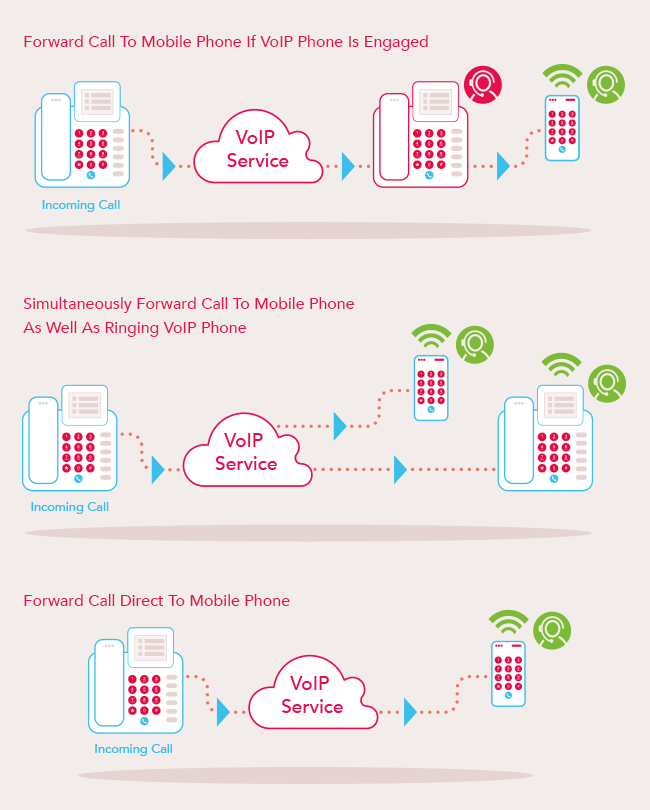
A: Generally, standard call forwarding allows diversion to only one number at a time. However, some advanced business phone systems or VoIP services might offer more sophisticated routing options, including simultaneous ringing or sequential forwarding to multiple numbers. Consult your provider for advanced features.
Q: What happens if my mobile phone is off or has no signal?
A: If your mobile phone is off or out of signal range, the diverted call will typically go to your mobile’s voicemail if you have one set up. If not, the caller might hear a busy tone, or the call might simply end, depending on your mobile network’s configuration.
Q: How do I know if my landline calls are being diverted?
A: After setting up diversion, you can test it by calling your landline number from a different phone. If the call rings on your mobile, it’s working. Some landline phones might also display an indicator or provide an audible confirmation when call forwarding is active.
Q: Can I set up conditional call forwarding (e.g., only when busy or no answer)?
A: Yes, most landline providers offer various types of call forwarding, including “always,” “when busy,” “when no answer,” and sometimes “when unreachable.” You can usually select the specific type of forwarding you need using different star codes or through your provider’s online portal.
Diverting your landline to mobile is a practical solution for modern communication needs, offering unparalleled flexibility and ensuring you remain accessible at all times. By carefully following the instructions from your service provider and understanding the available methods, you can easily set up this convenient feature. Remember to consider potential costs and always test the service to confirm it’s working correctly. This simple adjustment can significantly enhance your ability to manage calls effectively, bridging the gap between traditional landlines and mobile convenience. Embrace the freedom of staying connected, wherever life takes you, by mastering call diversion.
I need to follow specific formatting and content guidelines:
Article Design:
- Correct all errors (implies I should write correctly from scratch).
- No quoting or unnecessary characters.
Article Structure:
- Keywords: Insert diluted keywords into headings. The main keyword is “divert landline to mobile”.
- H1: Unique, on-topic.
- Text: Unique, no repeating templates.
- Table: At least one table (comparison, advantages, stages).
- Subheadings: H2 and H3.
- FAQ section: Create one.
- Lists: At least one bulleted and one numbered list.
- First paragraph: At least 4 sentences, smooth introduction.
- Sentence length: Alternate short and long sentences.
- Language: English.
Plan:
- H1: Something engaging like “Seamlessly Forward Calls: Your Guide to Diverting Landline to Mobile”.
- H2: Why Divert Your Landline Calls? (Advantages)
- Bulleted list for advantages.
- H2: Understanding Call Diversion Methods
- H3: Provider-Specific Services: Discuss contacting the landline provider.
- H3: Using Star Codes (If Available): Explain common star codes (21, 61, 67). This is a good place for a numbered list or a table if I compare codes.
- H3: Online Portals and Apps: Mention modern solutions.
- Table: I can use a table to compare different call diversion scenarios or common star codes and their functions. Let’s go with a table for common star codes and their actions.
- H2: Step-by-Step Guide to Setting Up Call Diversion
- Numbered list for the steps.
- H2: Important Considerations for Call Diversion
- Discuss costs, availability, testing.
- FAQ Section (H2):
- Several common questions and answers.
Keyword Dilution:
- H1: “Seamlessly Forward Calls: Your Guide to Diverting Landline to Mobile”
- H2: “Why Divert Your Landline Calls?”
- H2: “Understanding Call Diversion Methods”
- H3: “Provider-Specific Services for Landline Diversion”
- H3: “Utilizing Star Codes to Forward Your Calls”
- H2: “Step-by-Step Guide to Setting Up Landline to Mobile Diversion”
- H2: “Important Considerations When Diverting Landline Calls”
- H2: “Frequently Asked Questions About Landline Call Forwarding”
In today’s fast-paced world, staying connected is more crucial than ever, and managing communication across multiple devices can sometimes be a challenge. Whether you’re frequently on the go, working remotely, or simply want the convenience of receiving all your calls on a single device, diverting your landline calls directly to your mobile phone offers an invaluable solution. This practical guide will walk you through the various methods and essential considerations for setting up call forwarding, ensuring you never miss an important conversation again. By understanding the options available, you can seamlessly integrate your home or office landline into your mobile lifestyle, enhancing your accessibility and efficiency.
Diverting calls from your landline to your mobile phone provides a multitude of benefits, catering to both personal convenience and professional efficiency. It allows for greater flexibility and ensures continuous accessibility, regardless of your physical location. This simple yet powerful feature can significantly streamline your communication flow.
- Enhanced Mobility: Receive calls from your landline number even when you are away from home or the office.
- Improved Responsiveness: Never miss urgent calls, ensuring prompt communication with clients, family, or friends.
- Consolidated Communication: Manage all your calls from a single device, simplifying your communication setup.
- Business Continuity: Maintain professional availability for business landlines, even during power outages or office closures.
- Convenience: Avoid the need to give out multiple contact numbers; your landline number becomes your primary point of contact.
Diverting your landline calls to a mobile phone can be achieved through several methods, depending on your service provider and the type of landline you possess; It’s important to identify which option is best suited for your specific situation. Each method offers a distinct approach to managing your incoming calls.
Many landline providers offer their own dedicated call diversion services. These are often the most reliable methods as they are directly integrated into the network infrastructure. Typically, you would need to contact your landline provider directly to activate this feature. They can guide you through the setup process, explain any associated costs, and ensure the service is correctly configured for your line. Some providers may also offer online portals or mobile applications where you can manage these settings independently.
Star codes are special sequences of numbers and symbols that can be dialed directly from your landline phone to activate or deactivate various features, including call diversion. The availability and specific codes vary by region and provider, but some are widely recognized. These codes offer a quick way to manage your call forwarding settings without needing to contact customer support every time. Always verify the correct codes with your specific landline provider before attempting to use them.
Here’s a table outlining some common star codes and their typical functions:
| Star Code | Function | Description |
|---|---|---|
| 21 [number] # | All Calls Forwarding | Diverts all incoming calls immediately to the specified mobile number. |
| 61 [number] # | No Answer Forwarding | Diverts calls to the specified mobile number if you don’t answer within a set number of rings. |
| 67 [number] # | Busy Forwarding | Diverts calls to the specified mobile number if your landline is busy. |
| #21# | Deactivate All Calls Forwarding | Turns off the “All Calls Forwarding” feature. |
| #61# | Deactivate No Answer Forwarding | Turns off the “No Answer Forwarding” feature. |
Modern telecommunication companies often provide online customer portals or dedicated mobile applications that allow users to manage their landline services, including call diversion. These digital tools offer a convenient interface to activate, deactivate, and modify call forwarding settings from any internet-enabled device. Checking your provider’s website or app store for such a solution can provide an intuitive way to control your call routing preferences.
Setting up call diversion is a straightforward process, but it requires careful attention to detail to ensure your calls are routed correctly. Follow these steps to successfully divert your landline to your mobile phone.
- Identify Your Landline Provider: Know which company provides your landline service (e.g., AT&T, Verizon, BT, Vodafone).
- Check for Call Diversion Options: Visit your provider’s website, log into your account, or call their customer service to inquire about call forwarding services and any associated costs.
- Obtain Specific Instructions or Codes: Your provider will give you the exact star codes or guide you through their online portal/app.
- Activate the Service:
- Using Star Codes: Dial the specific star code (e.g., 21 followed by your mobile number, then #) from your landline phone. Listen for a confirmation tone or message.
- Via Online Portal/App: Log in, navigate to the call forwarding section, enter your mobile number, and activate the feature.
- Through Customer Service: Have a representative activate the service for you.
- Test the Diversion: Call your landline number from another phone (not your mobile) to ensure it correctly rings on your mobile device.
- Deactivate When Not Needed: If using star codes, dial the deactivation code (e.g., #21#) when you no longer need the service, or manage it through your provider’s portal.
Before implementing call diversion, there are several key factors you should take into account. Understanding these aspects will help you avoid unexpected issues and ensure a smooth experience. It’s always best to be fully informed about the service you’re utilizing.
Firstly, costs can vary significantly. Some providers offer call diversion as a standard feature, while others might charge a monthly fee or per-minute rates for forwarded calls. It is essential to clarify all potential charges with your provider beforehand to prevent any surprises on your bill. Secondly, the availability of certain features, especially star codes, can differ geographically and between service plans. What works for one provider in one country might not work for another, so always confirm with your specific service provider. Thirdly, consider the type of landline you have; traditional copper lines, VoIP (Voice over Internet Protocol) lines, and business PBX systems often have different setup procedures and capabilities for call forwarding. Lastly, thoroughly testing the diversion after setup is crucial. Make sure calls are indeed reaching your mobile phone correctly and that the quality is acceptable. This simple step can save you from missing important calls.
A: It depends on your landline service provider and your specific plan. Some providers include call forwarding as part of your package, while others might charge per minute for forwarded calls or a monthly fee for the feature. Always check with your provider for details.
A: Generally, standard call forwarding allows diversion to only one number at a time. However, some advanced business phone systems or VoIP services might offer more sophisticated routing options, including simultaneous ringing or sequential forwarding to multiple numbers. Consult your provider for advanced features.
A: If your mobile phone is off or out of signal range, the diverted call will typically go to your mobile’s voicemail if you have one set up. If not, the caller might hear a busy tone, or the call might simply end, depending on your mobile network’s configuration.
A: After setting up diversion, you can test it by calling your landline number from a different phone. If the call rings on your mobile, it’s working. Some landline phones might also display an indicator or provide an audible confirmation when call forwarding is active.
A: Yes, most landline providers offer various types of call forwarding, including “always,” “when busy,” “when no answer,” and sometimes “when unreachable.” You can usually select the specific type of forwarding you need using different star codes or through your provider’s online portal;
Diverting your landline to mobile is a practical solution for modern communication needs, offering unparalleled flexibility and ensuring you remain accessible at all times. By carefully following the instructions from your service provider and understanding the available methods, you can easily set up this convenient feature. Remember to consider potential costs and always test the service to confirm it’s working correctly. This simple adjustment can significantly enhance your ability to manage calls effectively, bridging the gap between traditional landlines and mobile convenience. Embrace the freedom of staying connected, wherever life takes you, by mastering call diversion.
Author
